Short answer: I have experienced wiper chatter and noise, smearing, and Auto wipes when it was not raining on my June 2020 Model 3. After removing film from the windshield and replacing the blades with Bosch AeroTwin A102S, the chattering stopped. For unwanted Auto activation, follow the separate controls branch below.
Chatter and smearing · Unwanted Auto wipes · Blade replacement
My experience: June 2020 Model 3, HW3, Intel Atom, 76,000+ miles. I have cleaned the windshield, removed film and changed to Bosch blades. The photos below are from my car.
Official guidance: cleaning products, blade dimensions, controls and the service-position procedure below are based on Tesla’s documents. I used Bosch AeroTwin A102S blades on my car.
Model 3 / Model Y wiper selection
| Vehicle or product | Size / fit requirement | What to choose |
|---|---|---|
| 2017–2023 Model 3 manual | Driver 26 in / 650 mm; passenger 19 in / 475 mm | Matching original connector; check actual build |
| Model Y guide linked below | Driver 26 in / 650 mm; passenger 20 in / 500 mm | Do not copy the shorter Model 3 passenger blade |
| Bosch AeroTwin A102S | Installed successfully on my June 2020 Model 3 | Verify Bosch’s fitment listing for your exact vehicle |
| Other direct-fit blades / Tesla set | Correct length, connector and secure engagement | A practical alternative when local fitment is clearer |
| Washer fluid | Avoid water-repellent or bug-wash formulations per Tesla | Use suitable freeze protection below 40°F / 4°C |
| Glass cleaner | Approved for automotive glass and rubber | Start with non-abrasive cleaning before replacing intact blades |
What stopped my Model 3 wiper chatter
The symptoms were familiar: a blade juddering across the glass, wiping noise and a smeared view instead of a clear sweep. I tried glass cleaning and film removal, and replaced the blades with Bosch AeroTwin A102S. After the film removal and replacement, the chattering was gone.
I would treat the glass and the blade as two things to inspect together. My result followed both actions;
1. Clean the windshield and blade edges
Tesla lists wax, organic debris and ice among contaminants that reduce wiping effectiveness. It allows washer fluid, rubbing alcohol or non-abrasive cleaner approved for automotive glass and rubber. Check the product label and avoid transferring dirt back with a used towel.
My film-removal experience is not a recommendation to use an aggressive abrasive, household scouring pad or a particular polish. Use a method appropriate to the glass and any existing treatment. If contamination persists, a professional glass clean is preferable to escalating to an unknown product.
2. Inspect the rubber, then replace if needed
Check for split, cracked or rough blade edges. Tesla says to replace damaged blades and recommends replacement at least annually. Cleaning cannot restore a physically damaged wiping edge.
I chose Bosch AeroTwin A102S replacements and was satisfied with the result after removing the windshield film. Confirm your vehicle and connector in the blade manufacturer’s fitment information before ordering.
3. Check what goes onto the glass
Tesla warns against washer fluids containing bug wash or water repellent because they can smear and make noise. Below 40°F (4°C), use fluid with suitable freeze protection. Cleaning products and washer fluids serve different purposes; follow their directions.
After the work, compare the same symptom on wet glass. Listen for chatter and check whether the wiped area clears without persistent streaks. Do this while parked before relying on the result in traffic.
Wipers activating when it is not raining
I have experienced this too, but Unexpected Auto activation and a blade chattering as it moves are different observations.
My car has the button on the end of the left stalk. A partial press gives a wipe and brings up the controls; a full press operates the washers. The left scroll wheel can select a setting while the wiper menu is showing.
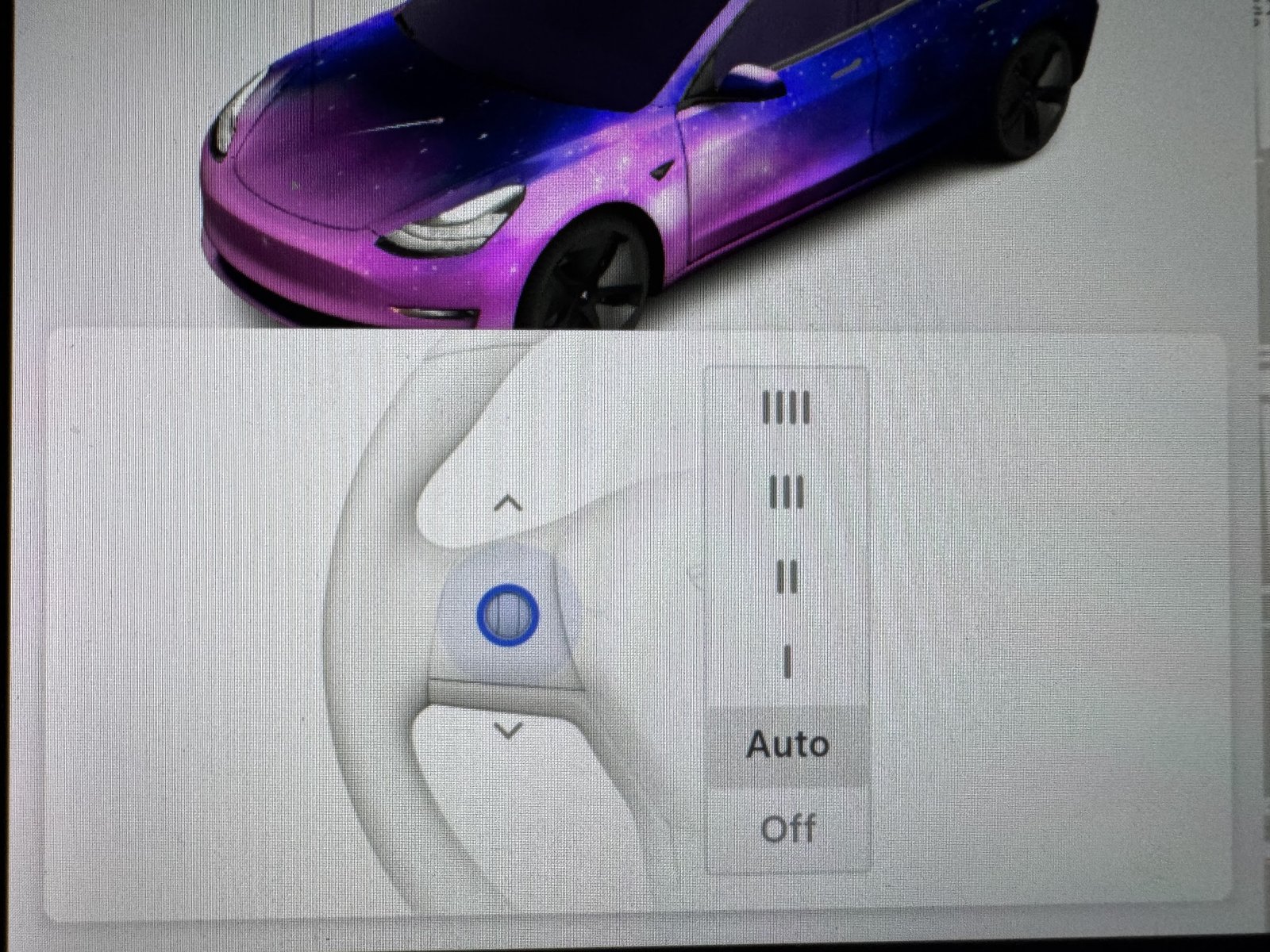
Tesla still describes Auto as a beta setting and advises manual operation when necessary. Its current manual says engaging Self-Driving sets the wipers to Auto, and they default to Auto again on the next engagement even if the setting was changed.
If the wiping behavior is unsuitable, choose the manual speed needed to maintain visibility. Pull over safely if you cannot see clearly. Check and clean the exterior windshield, including the area in front of the camera housing, while parked.
If camera-visibility warnings accompany the problem, use my camera unavailable checks. Report persistent behavior with the conditions and software version.
Model 3 blade sizes and safe replacement
Tesla’s Model 3 DIY guide specifies 26 inches (650 mm) for the driver side and 19 inches (475 mm) for the passenger side, with the correct original-style connection. Do not apply those sizes to a Model Y without checking its own guide. Length alone does not establish fit.
The current DIY guide also illustrates attachment differences around the 2024 change. The photos here show my 2020 setup. If the new blade does not attach as expected, stop and verify its compatibility.
Put the wipers in the service position
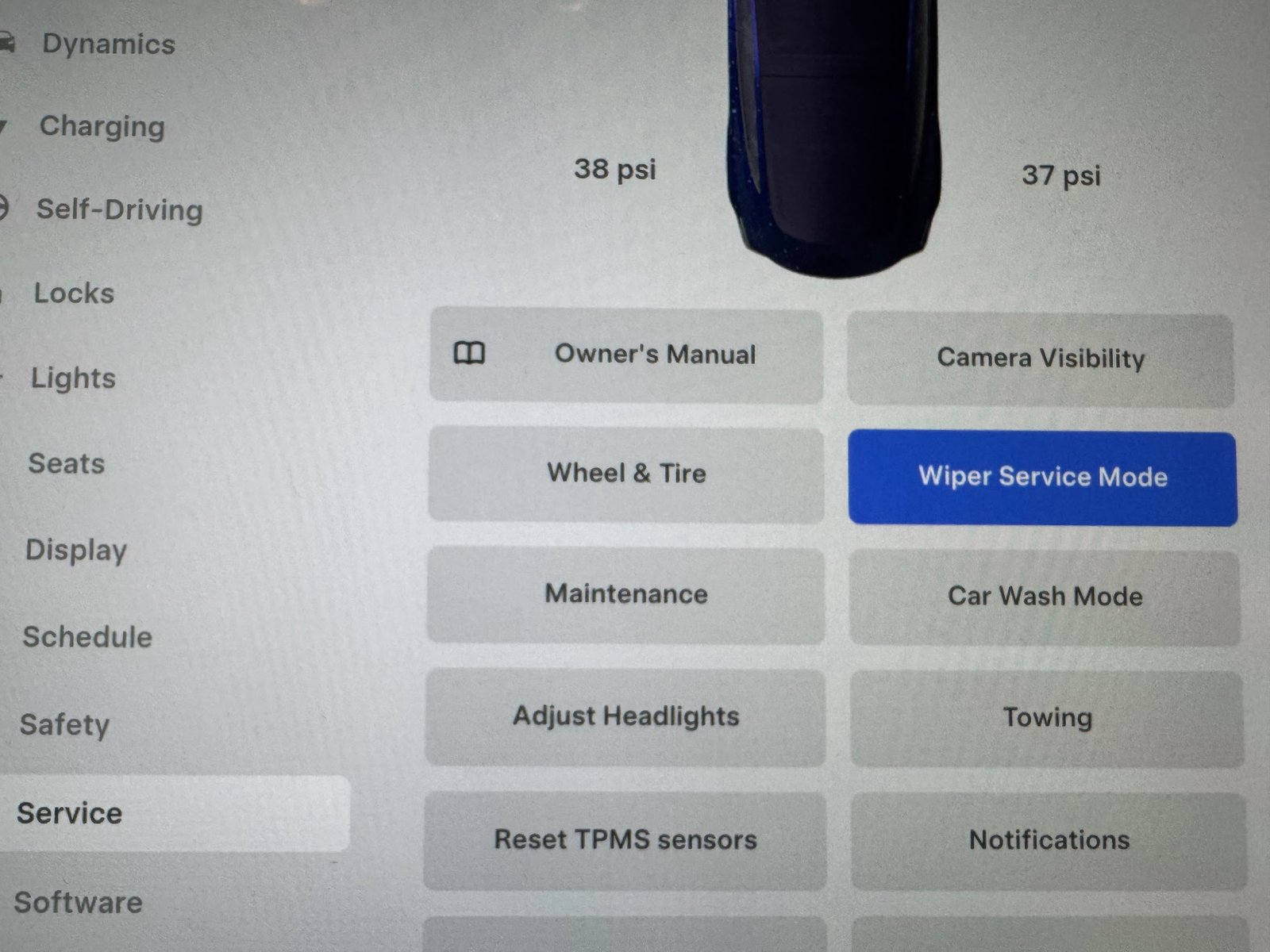
- Park, turn the wipers off, then select Controls > Service > Wiper Service Mode.
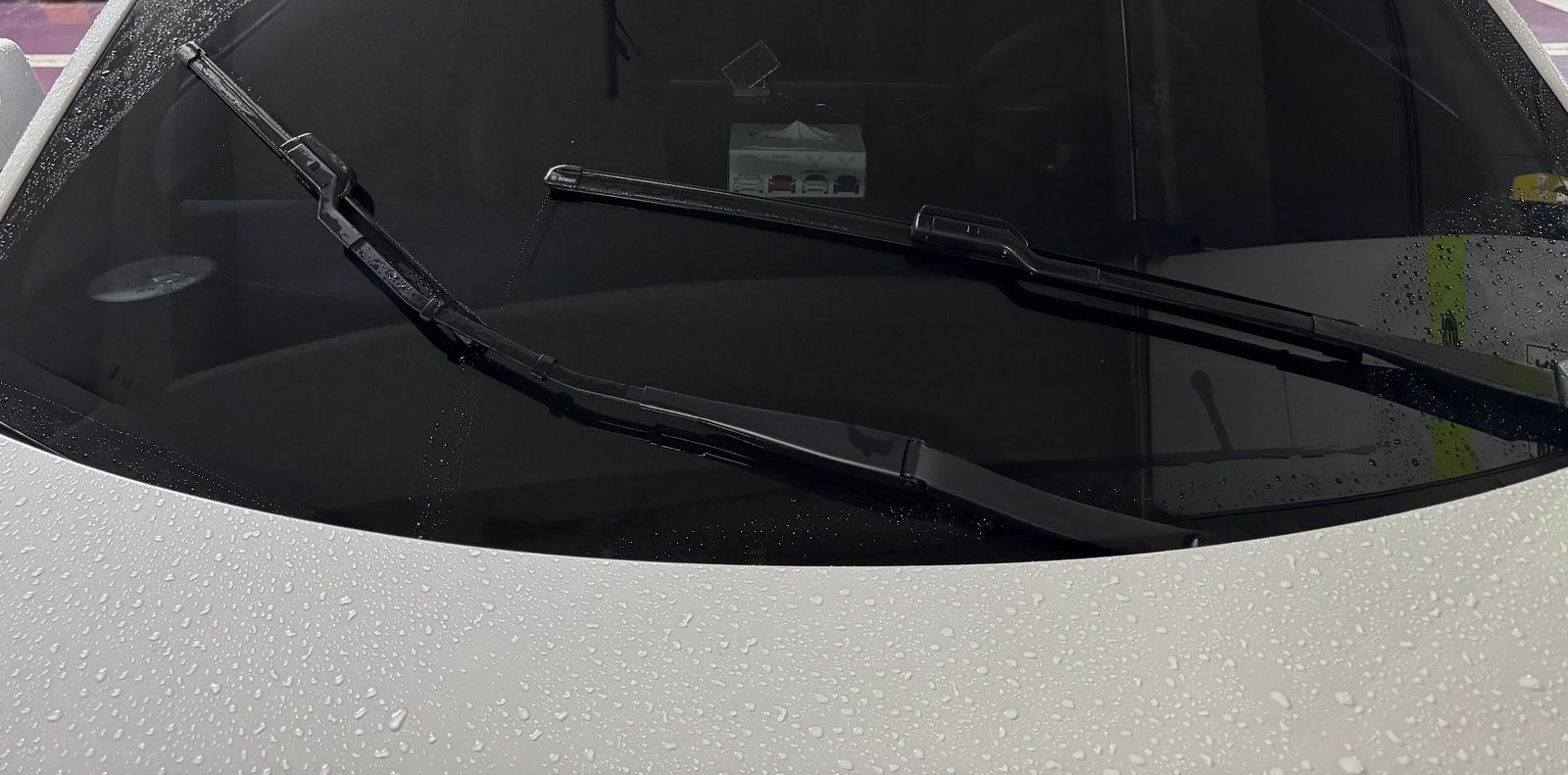
- Lift the arm only enough to access the blade. It does not lock upright.
- Place a towel between the arm and glass, and keep control of the spring-loaded arm.
Change the blade and confirm it is secure
- Support the arm, press the connector’s release tab and slide off the old blade as shown in Tesla’s guide for your attachment.
- Slide the matching replacement into place until locked. Perform a push-pull check to confirm it stays attached.
- Gently lower the arm. Once both blades are fitted and tools and towels are clear, turn Wiper Service Mode off.
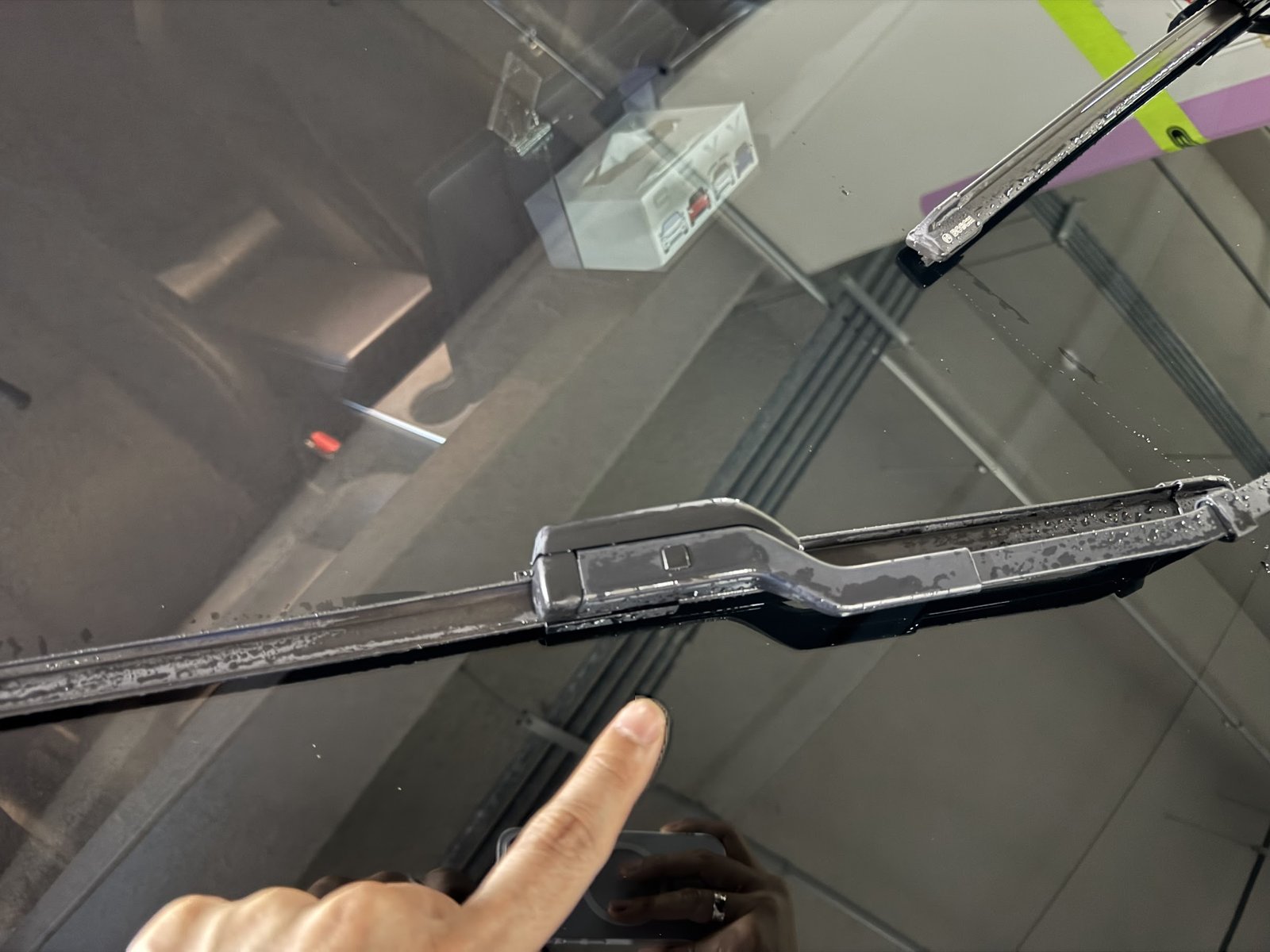
Keep the hood fully closed before running the wipers. Wet the glass for the final test. If the blade is loose, contacts trim or leaves visibility poor, correct the fit before driving.
When cleaning and blades are not enough
If suitable new blades on clean glass still chatter, record which side and which stroke are affected. Ask service to check the blade attachment and arm condition. I have not needed to establish an arm-angle diagnosis for the result described here, and I would not bend an arm based on sound alone.
A washer that does not deliver fluid is another symptom to report separately. No amount of Auto-setting changes will substitute for a clear windshield and a working wiping system.
Bosch A102S or another wiper set: how to choose
1. Match length and attachment together
The 2017–2023 Model 3 manual specifies 26-inch / 650 mm driver and 19-inch / 475 mm passenger blades, with a matching original connector. The linked Model Y guide uses 650 mm and 500 mm. Check the guide for the actual vehicle, particularly a refreshed build, before ordering. Matching the length alone is insufficient.
2. Avoid a poor adapter fit and contaminating washer fluid
A universal multi-adapter set is worthwhile only if its selected adapter is explicitly correct and locks without play. If the connector does not seat securely, return it rather than improvising. Tesla also warns that water-repellent or bug-wash washer-fluid formulations can create smearing and noise. Remove the contamination instead of expecting new rubber to wipe through it indefinitely.
3. My verified set and the direct-fit alternative
I installed Bosch AeroTwin A102S on my June 2020 Model 3. After film removal and the blade change, the chatter stopped. Bosch’s catalogue identifies A102S as a 650/475 mm set. Match the vehicle application and connector in the current fitment listing; do not buy this set for a Model Y merely because both use a 26-inch driver blade.
A vehicle-matched Tesla replacement set is the alternative if you prefer the original parts route. Whichever you choose, clean the glass, fit the blades in service mode, confirm secure engagement and test on wet glass. For dry-weather Auto activation, use the controls/camera branch: buying another blade set is not the first action.
FAQ
Which Bosch model did you install?
I installed Bosch AeroTwin A102S on my June 2020 Model 3. That is the set I used; verify the exact fit for your own vehicle and connector before ordering.
Did cleaning or replacement make the difference?
The chattering stopped after the film removal and Bosch replacement. Inspect both surfaces because a new blade still needs clean glass.
Did that fix unwanted Auto wipes too?
I have experienced unwanted Auto activation, but the clear outcome I can report is that the chattering stopped.
Should I replace the blades or clean the glass first?
Inspect both. Start with appropriate cleaning when the blades are intact; replace damaged rubber. My successful result involved clean glass and replacement blades together.
Official references
See Tesla’s wiper cleaning and washer-fluid guidance, blade replacement guide and wiper controls and Auto-mode notes. My own outcome is the chatter-free result after film removal and Bosch replacement described above.
— Volt Fix Garage
Leave a Reply